NapWake3 min read
How I designed a location alarm for the bus
A clock alarm misses the stop when the bus is late. How I designed NapWake around a place, a radius, and a wake that works on a locked phone.
A time alarm is a guess. You pick 7:40 because that is when the bus usually reaches your stop. Then the bus is late, or early, or you boarded one stop further down, and 7:40 happens in the wrong place. You are either standing in the aisle for ten minutes or waking up past where you meant to get off.
Maps do not fix this on their own. A map is built for someone who stays awake and watches the blue dot. The person I was designing for had already decided to sleep.
I was that person. I kept missing my stop, drew the alarm years ago, and only later took it from a sketch to a live Android app. It is called NapWake, and it is free on Google Play.
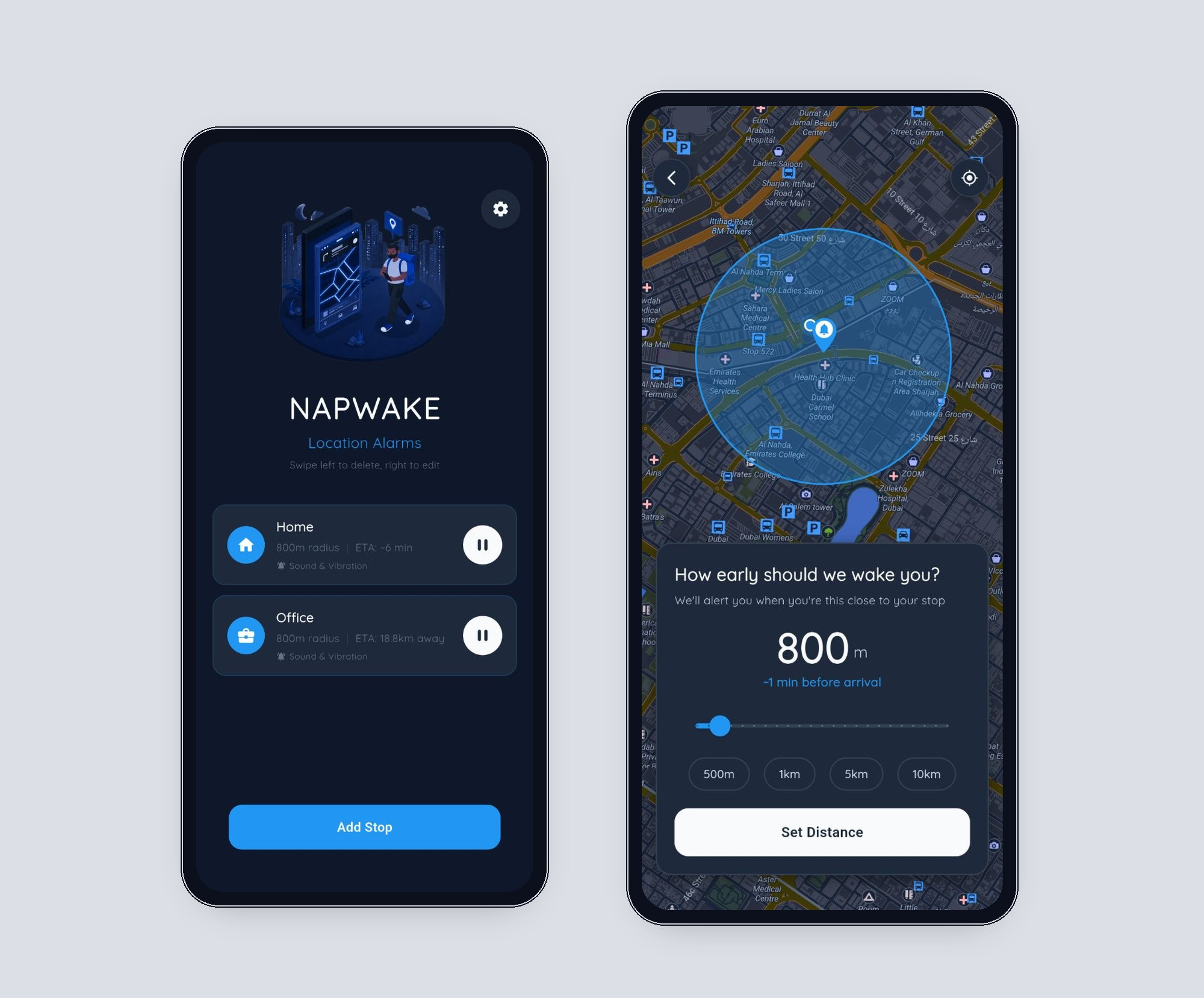
A place, and how early
The alarm is a destination and a radius, from a few hundred metres out to many kilometres. The screen does not ask anyone to think in metres while they are tired. The question is how early we should wake you, and the answer is a rough number of minutes as well as a circle on the map. You can see the decision. You do not have to trust a slider you cannot picture.
There are three ways to name the place, and they all land on the same setup. Search an address. Use where you are. Drag the map and drop a pin. A shared Google Maps link opens that same screen with the place already filled in, which matters when someone else sent you the stop and you do not want to search for it again.
The person reading it is half asleep
The wake assumes you are not fully awake. The place name is large. The map points at the stop and does not pan or zoom, so a stray thumb cannot lose it. There are two actions: I'm Awake, and Wake me in 500m.
Snooze is distance, not minutes. Traffic can swallow a five-minute snooze and still leave you on the bus. If you pass the stop, a second screen takes over. It says the stop was missed, how far past you are, and offers a plain way to confirm you are awake. The words are blunt because the person reading them is already past the stop.
Public is part of the design. If headphones are connected, the alarm plays through them, so you are not the person whose phone goes off in a quiet carriage. The setting says what happens if they are not: otherwise it rings out loud. If the headphones come out while it is ringing, the sound stops instead of jumping to the speaker. Volume keys mute the audio and leave the screen up.
The phone can lock. The alarm does not need the app in front of you. It comes up over the lock screen. Far from the stop, tracking stays coarse so a long ride does not burn the battery. Close in, it switches to a precise fix.
What I left out
There is no feed, no streak, and no reason to open the app except to set a stop or check one. A location alarm that asks you to stay engaged has forgotten why you downloaded it. You downloaded it so you could stop looking.
A few things stay open. Whether "how early" is obvious from the circle before anyone has ridden with it. Whether people choose headphone routing during setup, or only remember it after an alarm that was louder than they wanted. The screens, in order, are in the NapWake case study.