AI Systems2 min read
The architecture of Generative UI: Dynamic components in real-time interfaces
Moving beyond markdown streams. How to build design systems that allow AI models to compose live, structured, and interactive UI components safely.
For the first two years of the generative AI boom, every interface looked like an IRC chat window with streaming Markdown. If an AI recommended a financial plan, it wrote five bulleted paragraphs. If it compared three flight options, it formatted a rickety markdown table that broke on mobile.
Text is the lowest common denominator of machine intelligence, but it is one of the highest cognitive-load formats for humans to parse. In modern AI product design, the interface should not merely describe data—it should render interactive, manipulative affordances.
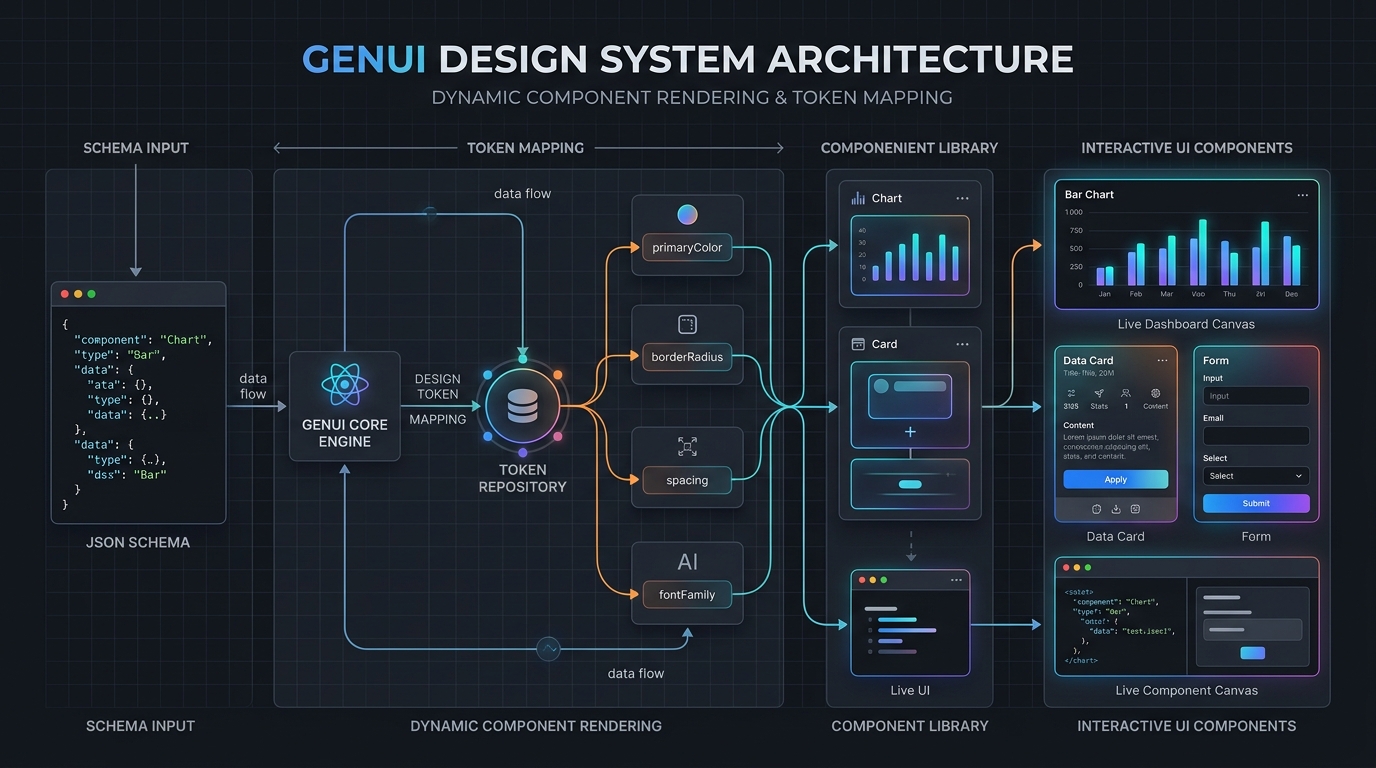
The JSON schema contract: Slots over freeform code
Early attempts at dynamic UI involved having LLMs generate arbitrary HTML, JSX, or Tailwind classes on the fly. In production, this fails immediately: it is insecure, breaks design system tokens, hallucinates invalid CSS, and produces unpredictable layouts.
The real architectural breakthrough in Generative UI (GenUI) is constraining the model to a deterministic component catalog through structured JSON schema tool calling. The model does not invent components; it parameterizes existing, vetted design system primitives.
- Schema-Driven Slots: The LLM outputs strict JSON representing component trees—such as MetricCards, BarCharts, ComparisonTables, and ActionSheets.
- Token Enforcement: Colors, spacing, typography, and borders are locked to the design system tokens at the runtime engine level, making visual breakage impossible.
- Interactive Binds: Generated components are fully interactive React/Flutter widgets connected to client state, allowing users to toggle filters, approve items, or drill down without re-prompting.
Designing for ephemeral interfaces
Traditional UX design creates permanent, static containers where data flows in and out. Generative UI inverts this: the container itself is synthesized on demand to match the user's immediate intent, and it may dissolve as soon as the task is completed.
This requires product designers to rethink layout permanence. When a user asks 'Compare my energy consumption between July and August and show where I can cut costs', the UI dynamically synthesizes a dual-axis comparison chart alongside an interactive slider to simulate savings. The screen was born for that exact question, answered it, and yielded an actionable decision in seconds.
State persistence and safety guardrails
When an interface is dynamically assembled by an AI model, state synchronization becomes the primary challenge. If the user edits a value inside a generated form or adjusts a slider on a generated chart, that mutation must update the agent's context window without triggering a destructive full-screen re-render.
As AI product designers, our job is no longer drawing static artboards for every edge case. Our job is architecting component schemas, designing constraint boundaries, and building resilient visual feedback loops so intelligent systems can compose the right interface at the right millisecond.