AI Design2 min read
Designing for non-deterministic interfaces: Latency, confidence, and hallucinations
Traditional UI assumes deterministic software. AI interfaces are probabilistic. Here is how product designers handle latency, internal uncertainty, and verification.
For forty years, software design has been built on a bedrock of determinism. You click a button, a database query runs, and the exact same modal opens every single time. Good UX meant zero ambiguity and predictable state transitions.
Large language models and multimodal AI break this foundation completely. They are probabilistic engines. The same prompt submitted three times might return three distinct variations, with varying confidence levels, varying latencies, and occasionally, hallucinations.
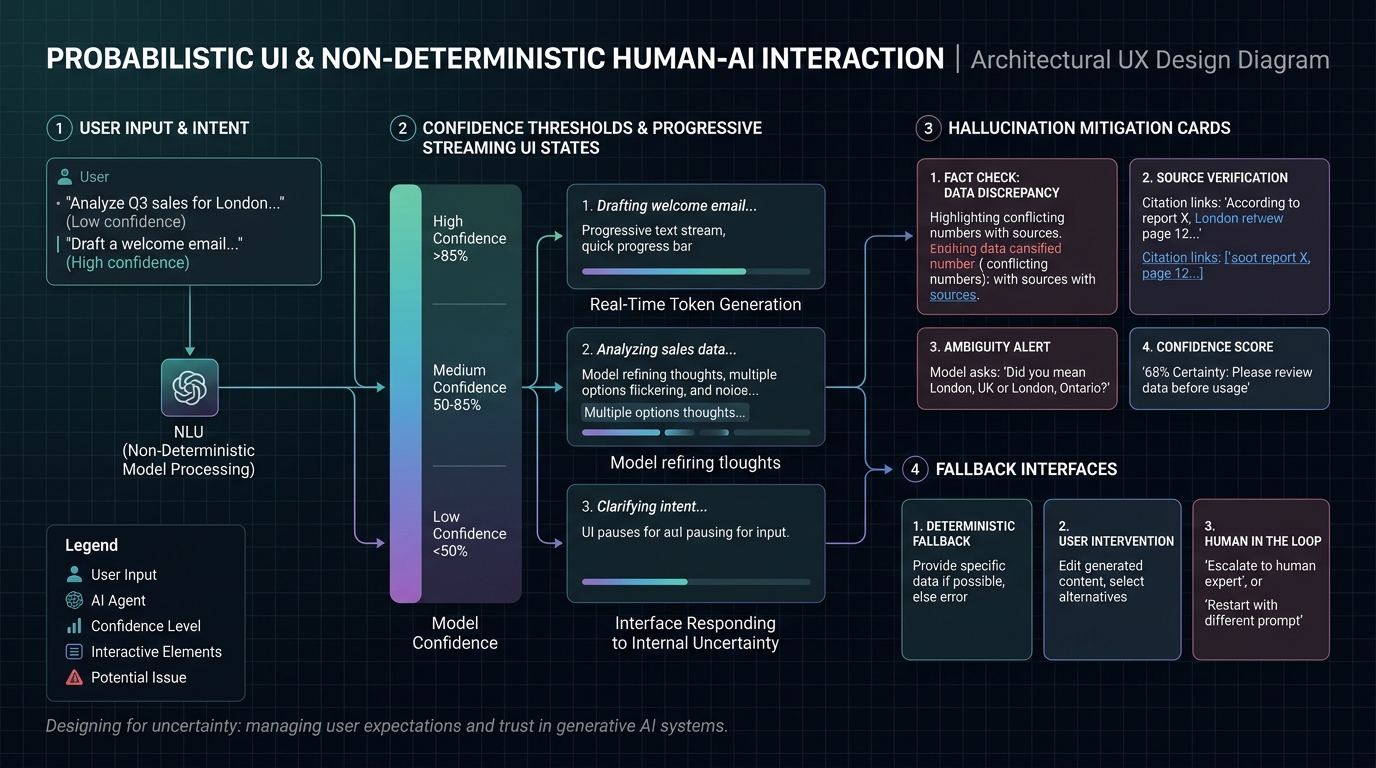
Confidence thresholds as a visual hierarchy
If a system is 98% confident in a flight booking detail, it should render directly as a confirmed itinerary card. If that same system is only 60% confident because the user's prompt was ambiguous ('book a ticket to London next Friday' when the user travels between both London, UK and London, Ontario), the UI must not guess silently.
We must design adaptive UI states mapped directly to model certainty thresholds:
- High Confidence (>85%): Progressive execution with instant optimistic UI rendering and background verification.
- Medium Confidence (50–85%): Ambiguity alerts with clarifying choice chips ('Did you mean London, UK or London, Ontario?') before executing state changes.
- Low Confidence (<50%): Explicit pause state prompting for user disambiguation, paired with graceful fallback to deterministic search controls.
Perceptual latency and progressive disclosure
In traditional web apps, a 3-second spinner is a critical failure. In complex AI reasoning pipelines, a 5-second thinking process is common. The designer's challenge is turning cognitive waiting time into transparent progress.
Generic skeleton loaders make users anxious because they offer zero information. Instead, displaying progressive cognitive breadcrumbs—'Scanning 42 documents', 'Synthesizing key differences', 'Drafting comparison matrix'—transforms dead waiting time into visible rigor and builds user trust.
Designing for verification, not blind trust
The greatest design sin in AI product design is presenting synthetic claims as infallible truths. Trust is built through verifiable provenance.
Every key statistic, generated quote, or synthesized recommendation should feature direct, one-click citation grounding. When users can hover over a claim and inspect the raw source paragraph or database record instantly, the interface shifts from a risky black box into an indispensable cognitive accelerator.